Save the prompts that work and run them on any AI model
Updated
A prompt library is the short list of prompts you reuse instead of retyping: the email
reply, the meeting summary, the code review, the rewrite into plain English. Each one is
saved with a name, written once with care, and run again whenever the same job comes
back. In AIHub the library sits in the side panel next to the chat, and every prompt in it
runs on any of the 19 models on the plan.
The point is not to collect prompts. It is to stop re-explaining the same task to a model
every morning, and to get the same quality of answer on day forty that you got on the day
you finally wrote the prompt properly. Below is how to build one that you will actually
use, and how it works in AIHub.
What belongs in a prompt library
Use one rule: if you have typed roughly the same request three times, save it. That
filter keeps the library small and full of things you do every week. It also keeps out
the thing most public "prompt libraries" are made of, which is hundreds of clever prompts
for jobs nobody on your team has.
A working library for one person is usually eight to twenty prompts. For a small team it
is rarely more than forty. Past that point people stop searching it and go back to typing
from memory, which defeats the purpose.
What a prompt worth saving looks like
A saved prompt is not a one-line request. It is the version of the request you would give
a competent new colleague, with the context and the limits written down. Five parts cover
almost every case.
Part
Example
Why it matters
The job
Reply to this customer email
One task per prompt keeps answers predictable
The goal
Keep the customer, offer a call
Models write better when they know what a good outcome is
The limits
Under 120 words, no promised dates
Limits are what a model ignores first when they are missing
The format
Plain text, no subject line
Saves the edit you would otherwise make every time
The inputs
{{notes}} and {{email}}
Placeholders mark the part that changes on every run
Put together, the email reply prompt looks like this:
Reply to the customer email below.
Goal: {{goal}}
Tone: plain and friendly, no exclamation marks
Length: under 120 words
Do not promise dates, refunds or features that are not in the notes.
If the email asks something the notes do not answer, say we will check and reply.
Notes:
{{notes}}
Email:
{{email}}
In AIHub, anything written in double curly braces becomes a field. When you run the
prompt, the app asks for the goal, the notes and the email, fills them in and puts the
finished prompt in the message box, so nobody has to find and replace text inside a
long prompt.
A starter library of eight prompts
If you are starting from nothing, these eight cover most of what a small team hands to a
model in a normal week. Write each one in your own words, with your own limits, rather
than copying a generic version.
Prompt
Job
The limit that makes it work
Email reply
Answer a customer or partner
Word cap, and no promises the notes do not support
Five-point summary
Condense a document or thread
Exactly five points, each with the source line it came from
Meeting to actions
Turn notes into who owes what
Every action has an owner and a date, or is flagged
Code review
Check a diff before merging
Bugs and risks first, style comments last or not at all
Plain-English rewrite
Make a dense paragraph readable
Keep every fact, cut jargon, same length or shorter
Claim check
Find statements you cannot back up
List each claim with "supported" or "needs a source"
Outline from a brief
Start a post, report or page
Headings only, one line of intent under each
Short version
Adapt long text for a post or update
Hard character count, no hashtags unless asked
Name prompts by the job, not by the model
Name each prompt with a verb and a job, such as "Reply to customer email" or "Summarise
in five points", so it can be found by typing what you want to do. Group them by the kind
of work, not by which model you first wrote them for.
That second point matters more than it looks. A prompt that has been tuned against one
model for months picks up small workarounds for that model's habits, and it quietly stops
working as well anywhere else. Keep saved prompts plain: say what you want, give the
limits, show the format. Then test each important prompt on two models at once, which is
the quickest way to tell a good prompt from a prompt that only suits one model. The full
method is in how to compare AI models side by side.
How the prompt library works in AIHub
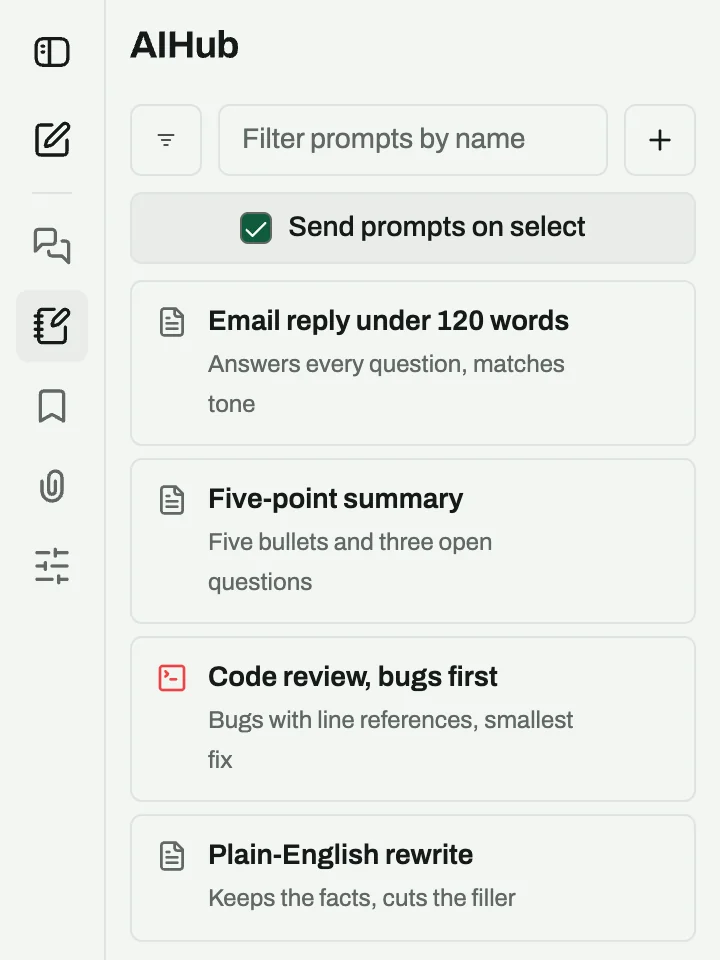
Saved prompts in the AIHub sidebar.
Save it once. Create a prompt from the Prompts panel, give it a name
and a category, and write the text with {{placeholders}} for the
parts that change. When you use it, a small form asks for each placeholder and fills
it in.
Find it by name. Search the panel by name or category, or type
/ in the message box to pick a saved prompt without leaving the chat.
Run it on any model. The prompt goes to whichever model is selected:
GPT-6, Claude, Gemini, Llama, Mistral, Perplexity, DeepSeek or Grok. Your library does
not change when the model does.
Compare two answers. Add a second model with the plus button and the
same prompt goes to both, with each reply showing what it cost in credits.
Improve it without losing it. Every save is kept as a version.
Switch the prompt editor to advanced mode to see the earlier versions and set any of
them back as the live one, so a change that makes answers worse can be rolled back.
The library is included on every plan. Running a saved prompt costs exactly what typing
it would, charged in credits at the selected model's price. On the Pro plan
at $19 a month you get 10,000 credits, and a
short message on Claude Sonnet 5 costs 7 of them. If you are weighing this against
paying for several assistants, the numbers are laid out in
ChatGPT Plus alternative: one subscription for every AI model.
Keep the library alive
Once a quarter, sort the library by what you actually used. Delete anything untouched for
three months, merge near-duplicates, and rewrite the two prompts that most often need
editing after the answer comes back. When a lab ships a new model, run your five most-used
prompts on it next to the model you use now before you switch; ChatGPT vs Claude vs Gemini covers which jobs each one tends to win.
A library that gets this treatment stays short and trusted. One that never gets pruned
turns into a folder nobody opens, and the team drifts back to typing the same request by
hand. For where saved prompts fit in a small team's day, see where AI actually lands in a small business.
Frequently asked questions
What is a prompt library?
+
A prompt library is a named, searchable collection of prompts you reuse instead of retyping. Each entry holds the instructions, the constraints and placeholders for the parts that change, so the same request produces the same kind of answer every time you run it.
Can I use my saved prompts with any model?
+
Yes. In AIHub a saved prompt is not tied to a model. It goes to whichever of the 19 models is selected, and you can send it to two models at once to compare the answers side by side.
Do saved prompts cost credits?
+
Saving and organising prompts is free. Running one costs the same as typing it by hand: the message is charged in credits at the selected model’s price, and a longer prompt costs a little more input. A 1,000-token prompt adds 2 credits of input on Claude Sonnet 5.
Which plans include the prompt library?
+
All of them. Pro ($19), Pro+ ($49) and Max ($99) all include the prompt library, conversation search and side-by-side compare.